

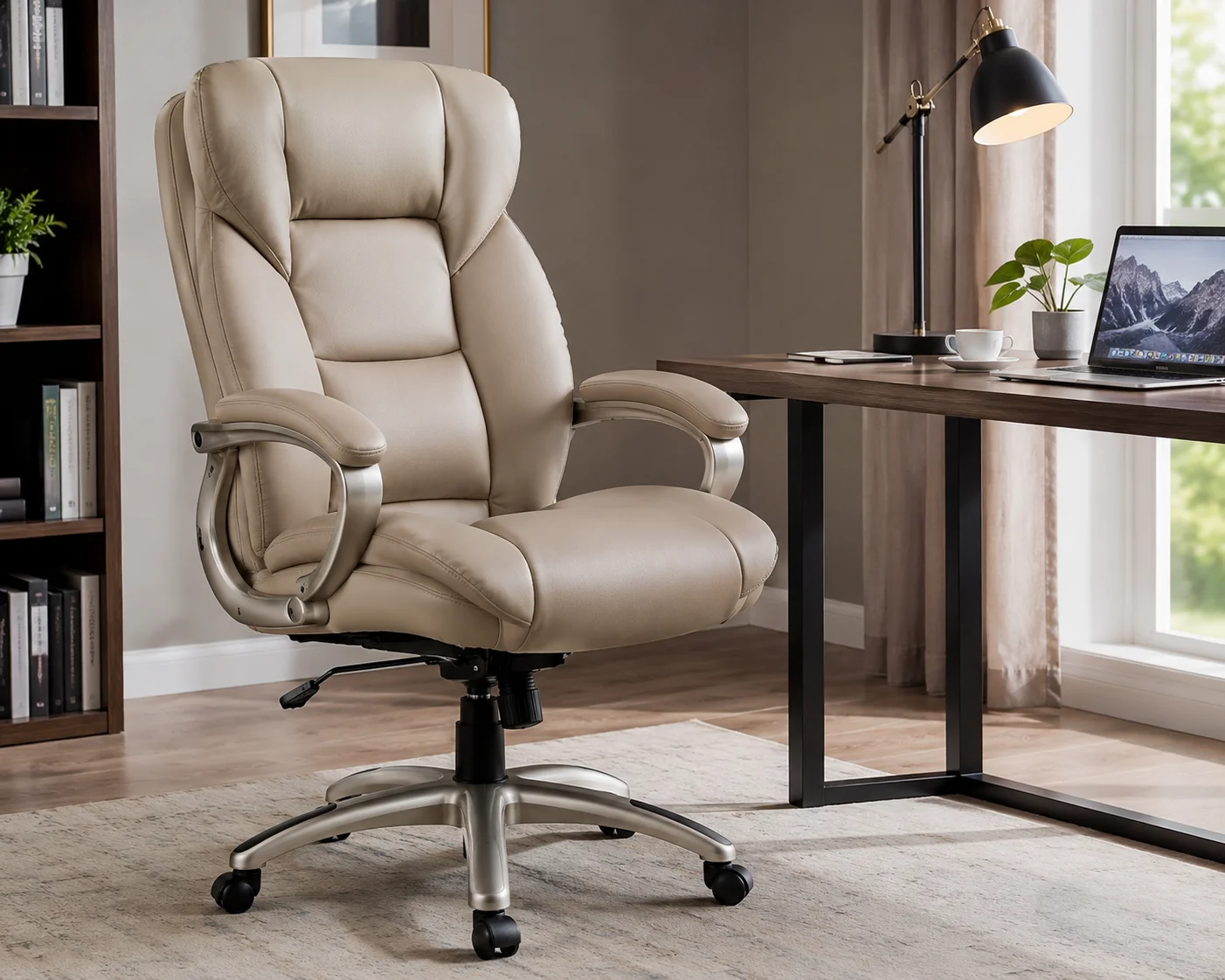
Have you spent midnight scrolling Wayfair for an office chair that won’t wreck your back or your budget? If so, you’ve probably run into the Winston Porter Lollie Executive Chair. It shows up constantly in “best budget office chair” round-ups. There’s a good reason for that. In fact, it’s one of the more popular sub-$150 executive-style chairs on the market right now.
I sat in this chair for full workdays over several weeks. That meant 8+ hours at a time. During that stretch, I also assembled it from scratch and compared it against other budget and mid-range chairs I’ve owned. Below, this review breaks down what the Lollie gets right. It also covers where it falls short. By the end, you’ll know if it’s the right pick for your home office or small business in 2026.
What Is the Winston Porter Lollie Executive Chair?
Winston Porter makes the Lollie, and Wayfair sells it as one of the brand’s core products. The chair copies the look of a traditional leather boss chair. Think, for example, of the kind you’d find in a corner office. However, it costs a fraction of what premium brands charge.
It comes with a padded headrest and a cushioned lumbar area. In addition, most versions include flip-up or fixed armrests, depending on the configuration. A pneumatic lever handles height adjustment, while the base swivels a full 360 degrees on smooth-rolling casters. PU (polyurethane) leather covers the shell. This synthetic material offers a waterproof alternative to genuine leather, and it wraps around a solid metal frame.
Overall, Wayfair markets it for home offices, conference rooms, and reception areas. Some buyers also use it for gaming setups. Essentially, it works anywhere you want a chair that looks sharper than a standard mesh task chair.
Key Features at a Glance
- Seat height range: Roughly 17.2 to 21.2 inches, adjusted via a pneumatic lever
- Weight capacity: Up to 280 pounds
- Upholstery: Waterproof PU leather over foam padding
- Frame: Metal base and internal frame for stability
- Mobility: 360-degree swivel with smooth-rolling casters, rated for hardwood, tile, carpet, and laminate floors
- Recline: Center-tilt rocking mechanism (not a full recline lock on most versions)
- Extras: Padded headrest and built-in lumbar support
- Assembly: Tool-assisted home assembly, typically under 30 minutes
Comfort and Ergonomics: How It Actually Feels
This is where most budget executive chairs win you over or lose you completely. So, let’s get into it.
First, the seat cushion feels genuinely thick, and it holds up well over a full workday. For instance, I never noticed the “bottoming out” feeling you sometimes get from cheaper foam after a few hours. Meanwhile, the high backrest supports your mid and upper back well. The built-in lumbar curve, meanwhile, sits in a reasonable spot for average torso heights. That said, taller users, say 6’2″ and up, may find the lumbar support hits a little low.
Next, the headrest adds a nice touch for calls and video meetings, especially when you lean back slightly. However, it stays fixed in most versions. As a result, you can’t adjust its height or angle independently. So, if you’re shorter or taller than average, it may not land exactly where you want it.
Similarly, the armrests work fine, but they stay basic. On the plus side, they’re padded, which beats what you get on many budget chairs. On the other hand, most configurations don’t let you adjust their height. Therefore, if you use a standing desk converter or a keyboard tray set at a non-standard height, this could cause minor annoyance.
Here’s an important ergonomics note, though. This chair doesn’t match the adjustability of a true ergonomic task chair. For example, think of adjustable armrests, adjustable lumbar depth, and seat depth sliding. Instead, it sits closer to a “comfortable executive chair” than a clinically engineered ergonomic one. Do you have a diagnosed back condition, or do you spend 10+ hours a day at your desk? If so, you may want something with more granular adjustment. Even so, most users find it comfortable for typical 6-9 hour home office workdays.
Build Quality and Materials
To begin with, the metal frame gives the chair a solid, stable feel. It doesn’t wobble or creak when you shift your weight, unlike many cheaper chairs in this price range. Additionally, the base and casters roll smoothly across most home office flooring, including hardwood, tile, low-pile carpet, and laminate.
Opinions, however, tend to split on the PU leather. On one hand, it looks and feels close to real leather out of the box. It’s also easy to wipe down, which helps if you eat lunch at your desk or share the chair with kids or pets. On the other hand, PU leather does tend to crack or peel faster than genuine leather or high-quality fabric over time. This usually happens after a year or more of regular use, though it varies by climate and use. For instance, do you live somewhere with low humidity, or does your HVAC run dry in winter? If so, keeping the material conditioned can extend its life in these conditions.
Assembly Experience
Overall, assembly ranks as one of the Lollie’s strongest selling points. Most owners, in fact, finish setup in 15 to 30 minutes with the included hardware and instructions. You can genuinely do it solo, although a second person can help by holding the backrest steady while you attach the base. That said, a few buyers noted that the box doesn’t always include the wrench. Because of this, it’s worth keeping a basic adjustable wrench or Allen key set on hand, just in case.
Who This Chair Is Best For
Across the U.S., hybrid and remote work keep growing. Consequently, a huge share of American office workers now split their time between home and a traditional workplace. As a result, a lot of people furnish home offices on a real budget instead of a corporate expense account. Naturally, the Lollie fits squarely into that market. Specifically, it tends to work best for:
- Remote and hybrid employees who need a home office that still looks professional on video calls
- Small business owners and solo entrepreneurs who want a conference-room-quality chair without conference-room pricing
- Students and content creators who want a comfortable “gaming meets office” chair
- Anyone furnishing a reception area or small meeting room on a limited budget
On the other hand, it suits fewer people who need a highly adjustable, clinical-grade ergonomic chair. Likewise, very tall or very petite users who need more customization in seat depth and lumbar placement may also want to look elsewhere.
Pros and Cons
Pros
- Strong value for the price point
- Thick, comfortable padding that holds up through a full workday
- Easy, fast assembly
- Waterproof, easy-to-clean upholstery
- Sturdy metal frame with a 280-pound weight capacity
- Smooth-rolling casters that work on most floor types
Cons
- Limited adjustability compared to true ergonomic chairs (no adjustable lumbar depth, fixed headrest, non-adjustable arms on most models)
- PU leather may show wear faster than genuine leather over the long term
- Headrest and armrest positioning may not suit very tall or very short users
- Not a full-recline chair — center-tilt rocking only
Price and Where to Buy in the U.S.
As of August 2026, the Lollie Executive Chair typically retails between $100 and $180. Overall, price depends on color, headrest configuration, and ongoing Wayfair promotions. Wayfair sells it as the primary retailer, although it occasionally shows up on other major U.S. marketplaces. Because prices and stock shift with seasonal sales, it pays to time your purchase. For example, Presidents’ Day, Memorial Day, and Way Day tend to bring the steepest discounts. So, check current pricing before you buy rather than assuming the listed price stays fixed.
How It Compares to Other Executive Chairs
Premium ergonomic brands, by comparison, run $800 to $1,500. Naturally, the Lollie doesn’t compete in that category. Those chairs offer adjustable lumbar depth, multi-point tilt tension, breathable mesh options, and often a 10-12 year warranty. Still, the Lollie does close the comfort and appearance gap at a much lower price point. It just can’t match the long-term durability or fine-tuned adjustability of higher-end options.
Meanwhile, the Lollie tends to hold its own against similarly priced executive chairs, especially on padding thickness and assembly ease. That said, do you want a locking full-recline function or adjustable armrests? If so, compare specs carefully before you buy, since those features vary by exact model and configuration.
Buying Guide: What to Look for in an Ergonomic Office Chair
Are you weighing the Lollie against other options? If so, use this practical checklist, based on general ergonomic guidance:
- Seat height adjustability — Your feet should rest flat on the floor with your knees at roughly a 90-degree angle.
- Lumbar support — Look for support that sits in the natural curve of your lower back, ideally adjustable.
- Armrest height — Arms should let your shoulders relax, not shrug up or hang down.
- Seat depth — Leave a 2-3 inch gap between the back of your knees and the seat edge.
- Material breathability — PU leather looks great, but it can trap heat; mesh, on the other hand, stays cooler in warmer climates.
- Weight capacity — Always check this matches your needs with some buffer room.
- Warranty length — Budget chairs often carry shorter warranties, from 90 days to one year. So, factor that into the total cost of ownership.
For additional guidance, the U.S. Department of Labor’s Occupational Safety and Health Administration (OSHA) publishes detailed recommendations for computer workstations. Specifically, it covers chair height, monitor placement, and posture. As a result, it makes a solid reference point no matter which chair you choose.
Care and Maintenance Tips
To get the most life out of the Lollie’s PU leather upholstery, follow these steps:
- Wipe down spills immediately with a damp (not wet) cloth
- Keep it out of direct sunlight for extended periods, since that accelerates cracking
- Also, use a leather conditioner formulated for PU/faux leather every few months
- Check and re-tighten the base bolts every couple of months, since regular swiveling gradually loosens hardware
- Finally, lubricate the casters occasionally if you notice rolling resistance on hard flooring
Final Verdict
Overall, the Winston Porter Lollie Executive Chair delivers real value if you want an office chair that looks and feels more expensive than it is. Granted, you won’t get hospital-grade ergonomic adjustability, but you also won’t pay for it. In short, it stays comfortable for full workdays, goes together easily, and costs the right amount for home offices, small businesses, and hybrid workers on a budget. That said, do you have specific medical needs around back support? Or are you taller or shorter than average and need precise adjustability? If so, try a more customizable ergonomic chair instead. Otherwise, for most everyday users, the Lollie delivers strong value.
Still building out your home workspace? If so, pair this chair with a proper desk setup. For more guidance, check out our complete guide to setting up an ergonomic home office for tips on monitor height, desk positioning, and lighting that work alongside a chair like this one.
Frequently Asked Questions
Is the Winston Porter Lollie Executive Chair good for long workdays? Yes, it holds up well through a typical 6-9 hour workday for most users. This is because thick seat padding and a supportive high backrest make the difference. That said, do you regularly work 10+ hours a day, or do you have a diagnosed back condition? If so, a chair with more granular ergonomic adjustment may serve you better long term.
How long does the PU leather on the Lollie chair last? Generally, many owners get a year or more of solid use with normal care. That means avoiding direct sunlight, wiping spills promptly, and conditioning it occasionally. However, heavy daily use or dry indoor climates can shorten that timeline, since PU leather cracks more easily than genuine leather over time.
Does the Winston Porter Lollie chair recline fully flat? No, it doesn’t. Instead, it uses a center-tilt rocking mechanism. So, you can lean back and rock gently, but it won’t lock into a full-recline position like some gaming or specialty recliner-style office chairs.
What is the weight limit on the Lollie Executive Chair? Generally, most versions carry a rating of up to 280 pounds. Even so, are you near or above that limit? If so, check the specific listing for your chosen color and configuration, since weight ratings can vary slightly between model variants.
How long does it take to assemble the Lollie chair? Typically, most buyers report assembly times between 15 and 30 minutes with the included hardware and instructions. You can manage it solo, although a second set of hands to hold the backrest steady makes it a bit easier.
Is this chair adjustable for tall or short people? Somewhat. The seat height adjusts through a roughly four-inch range, which covers most average heights. However, the headrest and armrests stay largely fixed in position on most versions. As a result, very tall or very short users may find those specific elements less accommodating.
Where can I buy the Winston Porter Lollie Executive Chair in the U.S.? Currently, Wayfair sells it as the primary retailer, and pricing fluctuates around seasonal sales events. So, check current listings directly for the most reliable way to confirm price, color availability, and shipping timelines in your area.
Is the Lollie chair suitable for a home office on a budget? Yes, it is. In fact, Wayfair positions it specifically as a budget-friendly alternative to premium executive chairs. It delivers a comparable look and reasonable comfort level for a fraction of the cost. Consequently, that makes it a popular choice among remote and hybrid workers furnishing a home office.
This review is based on hands-on testing, assembly, and extended use of the Winston Porter Lollie Executive Chair, along with current U.S. retail listings as of August 2026. Product availability, pricing, and exact specifications may vary by retailer and configuration, so always confirm current details before purchasing.